
In this lesson, you will learn about the key features of the Premiere Pro interface and how to work within a multi-panel program. You will also learn how to structure files on your hard drive and how to create a new Premiere Pro project.
Learning Targets
- The learner will distinguish the components that make up the interface in Premiere Pro.
- The learner will employ professional file structure and organization techniques.
Understanding Aspect Ratios
Aspect ratios describe the relationship between the width and the height, in this case for a video frame. The standard format for HDTV is 16:9, pronounced sixteen by nine. Before the advent of high-definition television, 4:3 (four by three) was the standard for televisions.
In an effort to differentiate themselves from broadcast television, Hollywood uses different widescreen formats with the most common one being 1.85:1. There are other formats including Imax and Ultra Panavision that are utilized in Hollywood, but these are dependent on special cameras.
As far as picking which aspect ratio to use there is no hard, fast rule that determines which size is the best. It normally depends on the audience and where the video will be shown. For the purposes of this class, we will use the standard 16:9 aspect ratio for our projects.
Understanding Pixel Aspect Ratios
As designers when we talk about pixels, we are speaking of a 1:1 square object. When we speak about pixels per inch, we understand that pixels are the smallest element in an image consisting of a single color/opacity.
In a video, this is not always the case. There are cameras that produce video using non-square pixels. Generally, these are older cameras that shoot in the DV format. For the purposes of this course, always default to using square pixels.
Understanding Frame Sizes
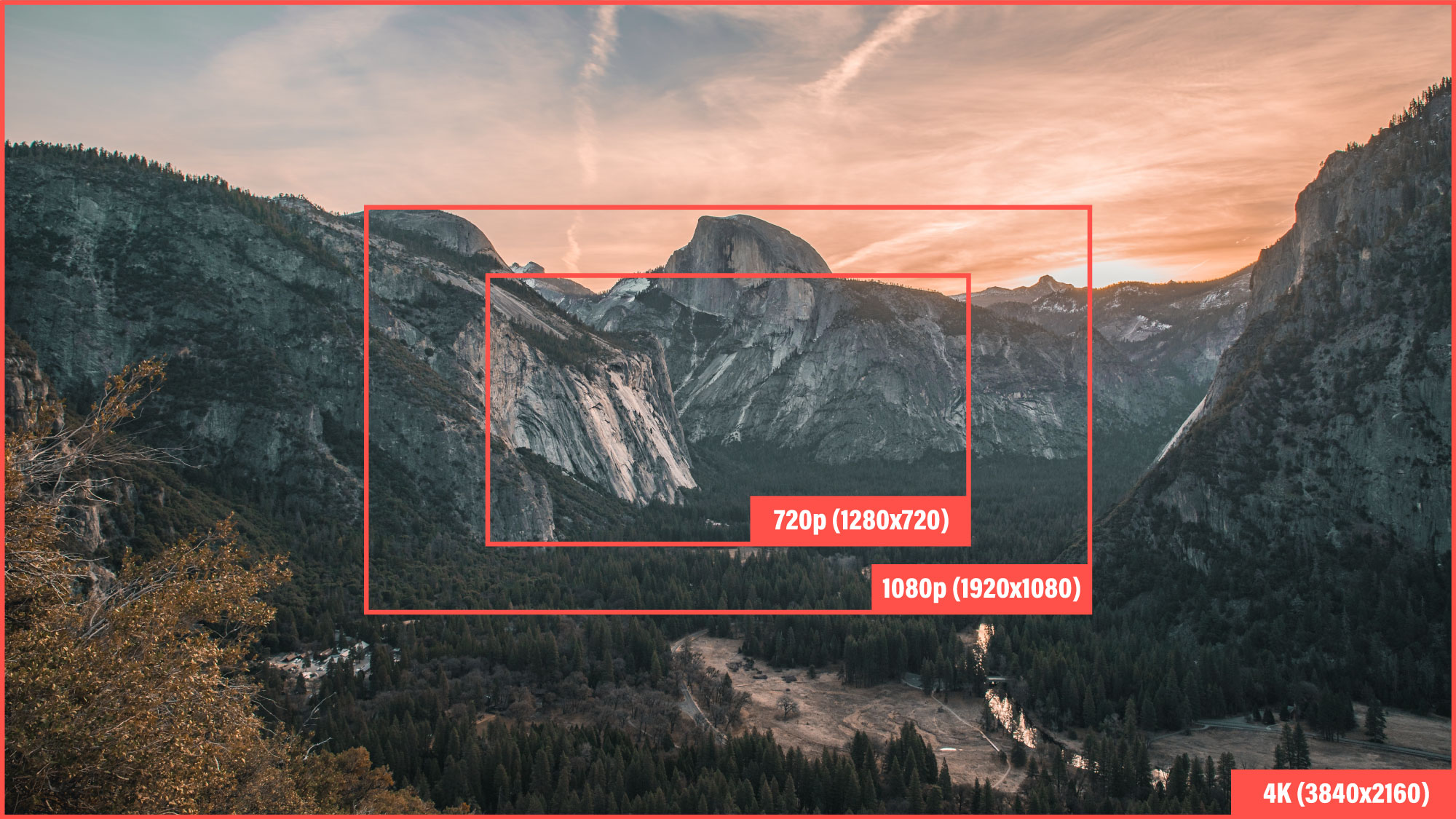
If you have ever shopped for a television, you have been confronted with these acronyms: 720p, 1080p, 4k, and 8k. All of these speak to the pixel dimensions of the image shown on screen. These acronyms are referred to as the frame size when working in video. All of these standards are based off the 16:9 aspect ratio.
| Video Standard | Pixel Dimensions | Common Names |
| 720p | 1280 x 720 | High Definition (HD) |
| 1080p | 1920 x 1080 | Full High Definition (FHD) |
| 4k | 3840 x 2160 | Ultra High Definition (UHD) |
| 8k | 7680 x 4320 |
Important notes:
As you may have noticed, 4k is not technically 4k in the horizontal dimension. Regardless of this fact, it is acceptable to refer to this size as 4k resolution. Some television manufacturers offer a “cinematic 4k” option. These televisions feature an image that is slightly larger in the pixel dimensions to make a true 4k resolution. This is also true for the 8k format. For the purposes of this course, please use the accepted video standards presented above.
Additional Reading:
https://www.cnet.com/news/tv-resolution-confusion-1080p-2k-uhd-4k-and-what-they-all-mean/
Understanding Frame Rate
The frame rate of a video is expressed in frames per second (fps), or the number of images that will be presented to the viewer in one second of time. The standard for most consumer video cameras is 30fps. If you want to get technical, the actual frame rate is 29.97, which was adopted to fix a transmission issue with black and white televisions when colored televisions were mass-produced. For the purposes of this class, 30fps is the same as 29.97.
Some other common frame rates are 24fps, 25fps, and 60fps. 24fps is common in cinema applications. If you read online, there are multiple viewpoints as to whether 24fps or 30fps is better. If you happen to live in a European country, then 25fps (PAL format) is the common standard to base video on. Finally, if you want to get to high-speed capture, 60fps, 120fps and beyond allow the editor the ability to slow the motion down and play it at the 30fps speed.
Building a New Sequence
Video Overview
In this video, you will learn how to bring together aspect ratios, pixel aspect ratios, frame sizes, and frame rates to build a sequence for a video.
Your Turn
Now that you understand the settings to build the proper sequence. Create a new sequence within your project, to ensure the file is set for 1080p, 30 frames per second (DSLR 1080p30 preset). Make sure to name the sequence what your final file will be named.

Seclusion in Lago di Braies by Luca Bravo available on Unsplash
https://unsplash.com/photos/hFzIoD0F_i8

Yosemite Valley by Casey Horner available at Unsplash
https://unsplash.com/photos/F-nYn66i0r0
Text adapted from: “Aspect Ratio” by Wikipedia is licensed under CC BY SA 3.0
Text adapted from: “Pixel Aspect Ratio” by Wikipedia is licensed under CC BY SA 3.0
Text adapted from: “Display Resolution” by Wikipedia is licensed under CC BY SA 3.0
Text adapted from: “Frame Rate” by Wikipedia is licensed under CC BY SA 3.0

This text is licensed under a Creative Commons Attribution-ShareAlike 4.0 International License.